Mega should have a confirm password field
Mega launched yesterday. I actually had to send a 30Mb file to a friend, but he told me that Dropbox was slow for him. Plus, my Dropbox was still uploading 25Gb of pictures that I had added the day before.
Anyway, it was the opportunity to try out Mega’s cloud storage system. So I decided to sign up:
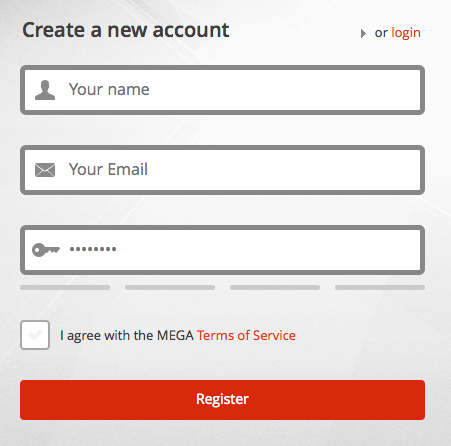
I filled the fields quickly, but then realized 2 things:
- Is the “Your name” field actually your username as well? Just in case, I changed it.
- There was no “Confirm password” field. So I cleared that field, and retyped my password carefully.
Upon receiving my confirmation email (establishing the fact that I had typed it correctly), I tried to login, but was prompted with the message “Invalid password”.
I looked for the usually available “Forgot password?” link but it wasn’t present. So I went to the help section and found the paragraph “I have forgotten my password. Can I reset it?”:
Unfortunately, your MEGA password is not just a password - it is the master encryption key to all of your data. If you lose it, you lose access to all of your files that are not in a shared folder and that you have no previously exported file or folder key for.
I learned 2 things:
- It’s not a password, it’s an encryption key (which may have led me to choose a different pass)
- It can’t be changed.
The rule here is that, if a password isn’t modifiable (or resettable), make the user confirm it. I’m now left with an account (linked to a specific username and email) that I can’t use.